How do I connect a RadioMaster TX16S to a Mac for a simulator?
Connect the TX16S with a data USB cable and choose USB Joystick (HID). macOS reads it as a standard joystick with no driver. Keep the joystick mode on Classic, avoid the "Sim Aileron" and "Sim Elevator" axis types, and be on EdgeTX 2.12.3 or later if your axes moved after an update.
Fly Before is the RC flight simulator for Mac that runs real ArduPilot in one click. Plug in your radio and practice every step on your Mac before you go to the field. See what Fly Before does
The TX16S and TX16S MK3 are among the radios most often mentioned in "will it work with my simulator" threads, and complaints about Mac simulators "not seeing" a TX16S come up regularly. Almost all of those reports have a handful of causes, listed below with their sources. This guide applies to any simulator that reads standard joysticks; the Fly Before specifics are marked.
At a glance
| Works on macOS | Yes, as "USB Joystick (HID)" |
|---|---|
| USB ID | 1209:4F54 |
| Name on the Mac | Starts with "OpenTX", because EdgeTX reports "OpenTX" as the USB manufacturer |
| Joystick modes | Classic and Advanced |
| Classic layout | CH1–8 are axes (X, Y, Z, Rx, Ry, Rz, Slider, Dial); CH9–32 are buttons, pressed when the channel is above zero; values 0–2047 |
| Channel order | AETR by default |
| Badge in Fly Before | Checked against the docs; the same EdgeTX profile was tried on RadioMaster TX15 and PS5 DualSense |
Setup checklist
- Note your EdgeTX version in the radio's system menu.
- Use a cable that carries data. Charge-only cables are the most common reason a radio "does not show up".
- Plug in and choose USB Joystick (HID) when EdgeTX asks what to do with the USB connection.
- Create a sim model with plain 100% channels: no expo, no rates, no mixes, no reversed channels.
- Set the model's USB joystick mode to Classic.
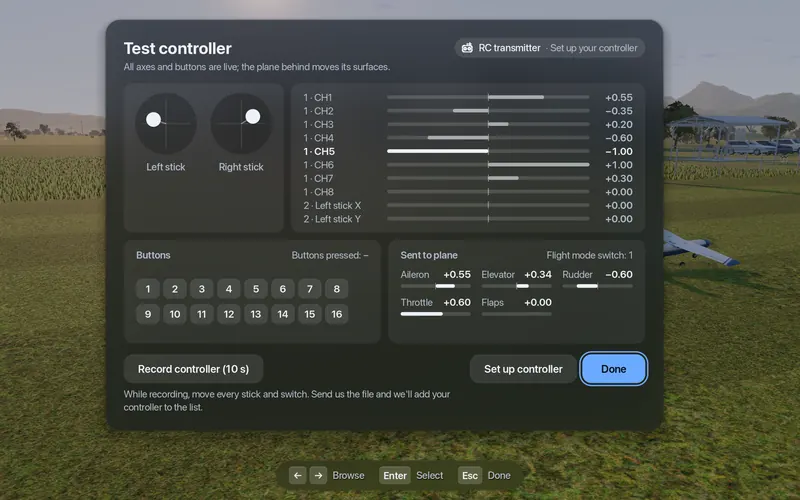
- Test. In Fly Before: Settings, Connections, Test. Each stick should move one bar. Move the throttle once before flying.
- If sticks land in the wrong place, run Set up controller and move each stick when asked.
Classic or Advanced mode?
EdgeTX lets you switch a model's USB joystick to Advanced mode, where you choose an axis type for each channel. One of those choices causes trouble on a Mac: the "Sim Aileron" and "Sim Elevator" types come from the HID simulation page, and the macOS joystick driver in SDL, which most Mac games use, ignores them. The channel is simply missing.
- Use Classic mode if you have no reason not to.
- In Advanced mode, give channels plain types: X, Y, Z, Rx, Ry, Rz, Slider, Dial.
- macOS orders axes by their type, not their position in the list, so changing types can also change which axis is which. The setup wizard sorts that out.
Firmware pitfalls
| EdgeTX version | What changed | What to do |
|---|---|---|
| Before 2.9 | CH8 reported as a Slider | Nothing on macOS; the order does not change there |
| 2.9 and later | CH8 reported as a Dial | Nothing on macOS; on Windows the order can shift |
| 2.11.0 – 2.12.2 | Classic joystick descriptor was changed | If axes moved after updating, go to 2.12.3 or later |
| 2.12.3 and later | Classic descriptor restored | Recommended |
EdgeTX also puts its firmware version into the device identifier that macOS games see, so any update changes that identifier. Some simulators then forget your calibration. Fly Before saves your settings under the USB ID and name without the version, so they survive updates.
Why your model memory matters
Simulators that read the radio as a joystick see the radio's output, after expo, rates and mixes. Ikarus, the maker of the aerofly interface, makes the same point: a calibration learned with one model memory breaks when expo, rates or mixes change. Keep a dedicated sim model with straight channels and let the simulator handle expo and rates. Fly Before has its own rate and deadzone settings.
Status: the TX16S layout in Fly Before comes from EdgeTX source code and its manual, so it carries the badge "Checked against the docs". The TX16S runs the same EdgeTX firmware and USB layout as the other radios in that profile. Tried on real hardware: RadioMaster TX15 and PS5 DualSense.
Questions
Does the RadioMaster TX16S work with a Mac?
Yes. Over USB it acts as a standard HID joystick that macOS reads without a driver. Choose USB Joystick (HID) on the radio, keep the model's joystick mode on Classic, and use a model memory with plain 100% channels.
Should I use Classic or Advanced joystick mode?
Classic, unless you have a specific reason. In Advanced mode, the Sim Aileron and Sim Elevator axis types are ignored on macOS, so those channels simply disappear. If you do use Advanced mode, give channels plain types such as X, Y, Z, Rx, Ry and Rz.
Fly Before: RC Flight Simulator is a native macOS app (Apple Silicon) for flying RC planes and fixed-wing VTOLs that runs real ArduPilot in one click through the free ArduPilot Helper. One-time purchase, not on sale yet.
Sources
- EdgeTX joystick code and descriptor: usb_joystick.cpp, usbd_desc.c
- EdgeTX manual, axis types: Configure advanced joystick with EdgeTX
- Descriptor change and fix: EdgeTX #6320, EdgeTX #7532
- macOS joystick driver (axis order, ignored Sim axes): SDL_iokitjoystick.c
- Ikarus on model memories and calibration: ikarus.net
Changelog
- : First published.