Your radio works on a Mac. Plug it in and fly
Connect a USB radio, sim dongle, gamepad or flight stick straight to your Mac. EdgeTX and OpenTX profiles are built in; the setup wizard learns any other USB controller in four stick moves. No drivers, no Windows.
- Tested on real hardware
RadioMaster TX15 and PS5 DualSense, on a MacBook Air M4. More devices are added with every update.
- The controller guarantee
If your controller does not work, record ten seconds of input in the app and send it to us. We add your device in an update.
- Ready when plugged in
EdgeTX, OpenTX and FreedomTX radios and ExpressLRS BLE Joystick have built-in profiles. PS5, PS4, Xbox and Switch Pro gamepads need no setup.
Find your radio
Every device, how it was checked, and the one setting to change on it. Last checked against our device list on November 15, 2026. USB IDs are vendor:product.
- EdgeTX
- OpenTX
- TBS FreedomTX
- ExpressLRS
- FrSky ETHOS
- Spektrum
- Graupner
- Futaba, Jeti and others
- Sim cables
- Gamepads
- Flight sticks and HOTAS
- DJI
| Device | Status | Setting on the controller | macOS notes |
|---|---|---|---|
| RadioMaster TX15 (EdgeTX) | Tried with a real controller | USB, then "USB Joystick (HID)", Classic mode | Recognized when plugged in |
| PS5 DualSense | Tried with a real controller | USB or Bluetooth | Nothing to set up |
| EdgeTX radios: RadioMaster TX15, TX16S, TX16S MK3, TX12, Boxer, Pocket, Zorro, MT12, GX12; Jumper T-Pro, T12, T14, T15, T20, Bumblebee; BetaFPV LR3PRO; iFlight Commando 8, C14; FlySky NV14, PL18, EL18, PA01, NB4+; FrSky on EdgeTX | Checked against the docs | Plug in USB, choose "USB Joystick (HID)". Keep the model's USB joystick mode on Classic. Channel order AETR. | 1209:4F54. CH1–8 are axes, CH9–32 are buttons. Don't use Sim Aileron/Elevator axis types in Advanced mode. EdgeTX 2.11.0–2.12.2 changed the classic layout; 2.12.3 restored it. |
| OpenTX 2.3 (FrSky Taranis X9D, QX7, X-Lite) | Checked against the docs | USB, then Joystick | 1209:4F54 |
| TBS Tango 2, Mambo (FreedomTX) | Checked against the docs | USB-C, then "USB Joystick (HID)" | Shows up as "TBS Joystick"; OpenTX 2.3 layout |
| ExpressLRS BLE Joystick 4.x and 3.x | Checked against the docs | ELRS Lua script, "BLE Joystick", then pair in macOS Bluetooth settings | Channel order differs between 3.x and 4.x; both have a profile. Can drop on Bluetooth: prefer USB. |
| FrSky ETHOS (X20, X20S, X18) | Set up your controller | Plug in, choose "Joystick". Only channels with a mix are sent. | CH7 and CH8 reported swapped (community) |
| Spektrum NX and iX | Set up your controller | System Setup, USB Settings, Game Controller (AirWare 3.13B or later) | Default channel order TAER |
| Spektrum WS2000 dongle | Set up your controller | Bind while plugging in | 0483:572B "SPEKTRUM RECEIVER" (community). No buttons, TAER. |
| Graupner HoTT mz-12, mz-16, mz-32 | Set up your controller | System, USB, JOYSTICK, range -100~100% | "0~100%" gives half range |
| FrSky XSR-SIM, Orqa FPV.Ctrl, Emax E8, Futaba T16IZ, WSC-1, T32MZ, Jeti, Ikarus interface, RealFlight InterLink DX, Elite, X | Set up your controller | See the manufacturer's manual | No documented axis order |
| Sim cables and dongles: PhoenixRC, RealFlight G5–G7 cable, FMS/XTR, OrangeRX, VRC2, "22-in-1" | Community report | Trainer port. If there is a mode switch, try "G5+" or "XTR/G2/FMS". | Some send channels alternately, so an axis may jitter; the wizard filters noisy axes. Based on community reports; check it with the wizard. |
| PS5 DualSense and Edge, PS4 DualShock 4, Xbox over Bluetooth, Switch Pro and Joy-Con, Stadia, Luna, Steam Controller | Gamepad (ready) | USB or Bluetooth | Luna: no rumble over Bluetooth on macOS |
| Xbox controller on a USB cable | Gamepad (ready) | Use Bluetooth | macOS hands wired Xbox pads to a different driver |
| 8BitDo, Logitech F310, F710 | Gamepad (ready) | Switch to D mode | X mode does not work on macOS with SDL 3.2 |
| Logitech Extreme 3D Pro, X56 stick, Saitek Pro Flight pedals | Community report | None | Read raw on macOS |
| X52, X52 Pro, X56 throttle, T.16000M, TWCS, T.Flight HOTAS, TFRP, VKB, Virpil, WinWing | Set up your controller | None | More than 10 axes or 128 buttons are not read |
| DJI FPV RC 2, RC 3, RC Motion | Unsupported | None | No documented HID joystick mode |
Sources for every row (manufacturer manuals, EdgeTX, OpenTX, FreedomTX and ExpressLRS source code, SDL and Godot source, community device dumps) are linked on the device-family pages and in our controller notes, available on request.
$49.99 once, everything included · On sale soonRequirements
Learned in four stick moves
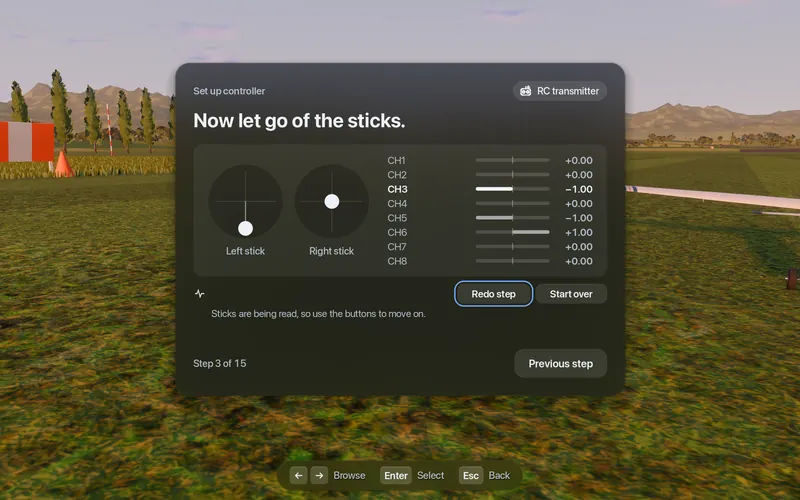
Leave the sticks alone while it measures rest position and noise on every axis.
Push and hold aileron, elevator and rudder, one at a time. Each is bound to the axis that moved most, with its direction.
Throttle: bottom, top, let go. It detects whether your throttle stays put or springs back.
Optional: flap and flight-mode switches. Then it saves calibration and a deadzone for each axis.
Every step has "Wrong, try again". Your settings are found again after sleep, a re-plug or a firmware update.
$49.99 once, everything included · On sale soonRequirements
What the badges mean
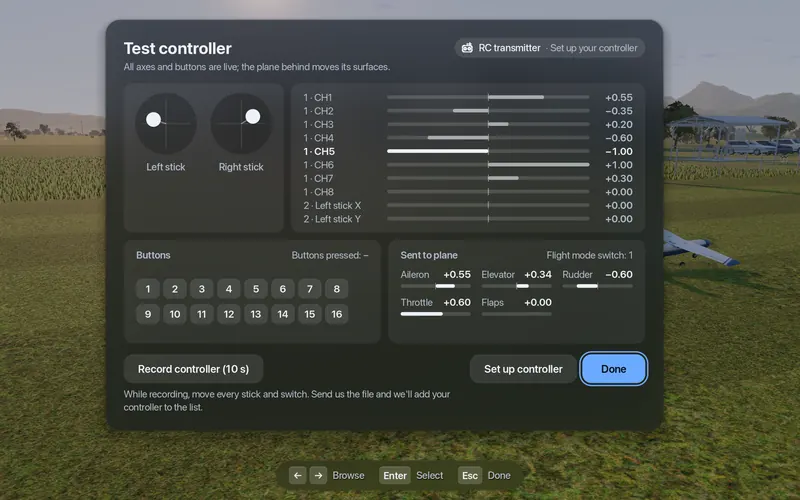
The same badges appear next to each device on the "Test controller" screen in the app.
- Checked against the docs Axis order taken from a primary source. Works when plugged in.
- Community report Based on a user's device dump. Check it with the wizard.
- Tried with a real controller Confirmed on real hardware.
- Gamepad (ready) A gamepad with a standard mapping. Nothing to set up.
- Set up your controller No documented layout. The setup wizard learns it in four stick moves.
- Unsupported No known way to read it on macOS.
Controller questions
Will my RC radio work with Fly Before on a Mac?
If your radio has a USB joystick (HID) mode, it will very likely work. EdgeTX, OpenTX and FreedomTX radios have a built-in profile based on their documented USB layout. Other radios, dongles and flight sticks are learned in four stick moves with the setup wizard. Every entry in the table above says how it was checked. If your controller does not work, record ten seconds of input in the app and send it to us: we add your device.
What do I need to change on my radio?
Plug it in with a data USB cable (some cables only charge) and choose USB Joystick (HID). On EdgeTX keep the model's USB joystick mode on Classic. On a Spektrum NX radio choose System Setup, USB Settings, Game Controller. On FrSky ETHOS choose Joystick.
My throttle starts at half. Why?
On macOS, an axis reports nothing until it first moves, so a throttle sitting at the bottom can look like half throttle. Fly Before treats an axis that has never moved as unknown, keeps throttle at zero and asks you to move the throttle once.
The sticks are swapped: aileron moves the rudder
Your radio uses a different channel order. EdgeTX defaults to AETR and Spektrum to TAER. Run Set up controller and move each stick once; Fly Before learns which channel is which.
Does Bluetooth work?
Gamepads work over Bluetooth. RC radios with an ExpressLRS BLE joystick mode can pair too, but that link is known to drop after about 30 seconds on some macOS versions, so we recommend USB.
My controller isn't listed or behaves strangely
Open Test controller and choose Record controller (10 s), moving every stick and switch while it records. Send us the file and we will add your controller. If you got it working, Share my settings exports a file other pilots can load.
Steam turned my radio into a gamepad
If you launch Fly Before from Steam and Steam Input wraps your radio, the app sees only a virtual gamepad and warns you. Fix: in Steam, right-click Fly Before, Properties, Controller, turn Steam Input off. Then re-plug the radio.