ArduPilot on your Mac, one click
Real ArduPlane SITL starts with one switch. Rehearse AUTO missions, RTL, failsafes and QuadPlane transitions with QGroundControl connected, before the maiden.
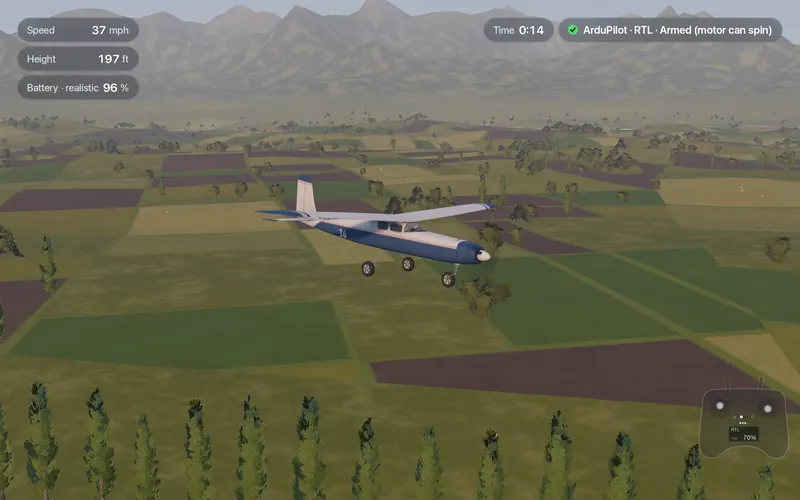
- ArduPlane 4.7.2
- Real SITL, started and stopped for you
- QGroundControl
- Connect over UDP 14550 or TCP 5760
- 6 modes
- FBWA, TAKEOFF, AUTO, RTL, LOITER and MANUAL on one switch
- .BIN log
- Ready for UAV Log Viewer or Mission Planner
Tested against ArduPlane 4.7.2 SITL
These pass our automated test runs. They are flown by the real autopilot code, not an imitation of it.
| What is tested | Aircraft |
|---|---|
| Flies under ArduPlane SITL | All 43 aircraft |
| Automatic takeoff | Trainer, Explorer |
| Waypoint mission (AUTO) | Trainer, Explorer |
| Automatic landing | Trainer, Explorer |
| Radio, battery and geofence failsafes | Trainer, Explorer |
| QuadPlane transition, hover to forward flight | Tilt-rotor VTOL |
ArduPilot runs on all 43 aircraft; each of them ships with its own parameter file.
$49.99 once, everything included · On sale soonRequirements
How it works
You never touch a compiler. Four steps from download to a logged flight.
Download the free ArduPilot helper
One download from the ArduPilot Helper page. Fly Before starts and stops ArduPlane for you.
Turn on "Fly with ArduPilot"
In Settings, Connections. Fly Before loads the parameter file for your plane and stops ArduPilot when you finish.
Arm and fly
Throttle down, rudder full right for three seconds. Mode and arming state show on screen. A six-position mode switch maps to FBWA, TAKEOFF, AUTO, RTL, LOITER and MANUAL on fixed-wing planes.
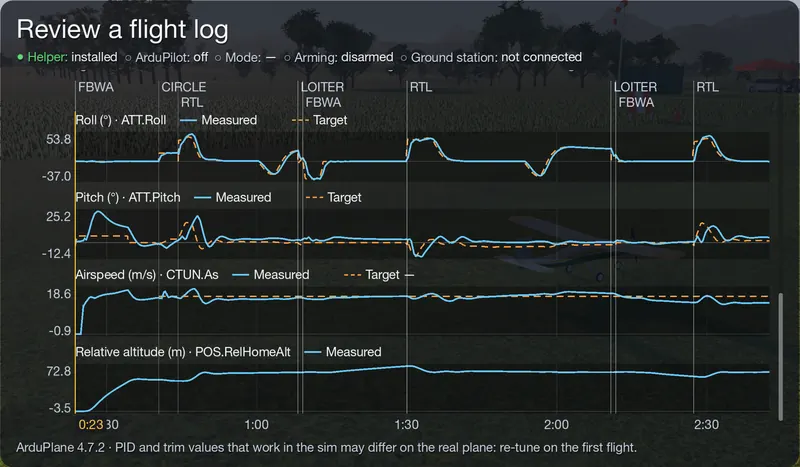
Read the log
"Show last log" opens the .BIN dataflash log, ready for UAV Log Viewer or Mission Planner.
$49.99 once, everything included · On sale soonRequirements
What you can rehearse
The flights you want to get right before the real airframe leaves the ground.
FBWA
Fly-by-wire with limits on bank and pitch. A good first mode when your plane has a flight controller.
RTL
Flip the switch and watch the plane climb to its return altitude, fly home and loiter overhead.
AUTO missions
Upload a mission from QGroundControl, arm, and let ArduPilot fly the waypoints while you watch.
Failsafe
Lose the radio link on purpose and see what your failsafe settings actually do.
QuadPlane transition
Take off in hover, transition to forward flight and back to a vertical landing on the tilt-rotor VTOL. VTOL practice
Your parameters stay
Parameters you change in QGroundControl are saved after the flight and loaded next time. "Back to original settings" is always one button.
QGroundControl
Start an ArduPilot flight and open QGroundControl on the same Mac: it connects automatically over UDP 14550, with no setup. Read and write parameters, upload and download missions and switch modes from QGroundControl. Other ground stations can add a TCP link to 127.0.0.1, port 5760.
QGroundControl is a separate, free program from its own project. Install it from its website.
- Protocol
- Standard MAVLink, the protocol QGroundControl and Mission Planner speak
- Same Mac
- UDP 14550, connects automatically; or TCP 127.0.0.1:5760
- Over the link
- Parameter download and upload, mission upload and download, mode changes
$49.99 once, everything included · On sale soonRequirements
Good to know
- Do not tune your PIDs in the sim and copy them to the real plane. The flight model estimates inertia; tune on the real aircraft.
- The ArduPilot helper runs on Apple Silicon only.
- Fly Before's own physics fly the plane; ArduPilot sees simulated sensors. It is a rehearsal, not a hardware-in-the-loop test.
- INAV is not built in.
License and source
ArduPilot is free software under the GNU GPL version 3. Fly Before does not include it in the app: the ArduPilot helper is a separate download that runs ArduPlane as its own program. The helper ships with the GPL license text and a note of our changes, and the matching source code is offered free of charge on the same download page.
Fly Before is not affiliated with or endorsed by ArduPilot or the ArduPilot project. "ArduPilot" is used only to describe compatibility.