How do you run ArduPilot SITL on an Apple Silicon Mac?
You build it from source: there is no ready-made macOS SITL binary on ArduPilot's firmware server. On a current Mac with Xcode 26 the build needs a one-line linker workaround, then takes a few minutes. If you only want to fly and rehearse, Fly Before ships ArduPlane SITL as a separate helper and starts it with one switch.
Fly Before is the RC flight simulator for Mac that runs real ArduPilot in one click. Plug in your radio and practice every step on your Mac before you go to the field. See what Fly Before does
SITL ("software in the loop") is the real ArduPilot flight-controller code compiled to run on a computer instead of a flight controller. It is how ArduPilot developers test, and it is a good way to rehearse a mission, a failsafe or a QuadPlane transition before you risk an airframe. On Linux it is routine. On a Mac it has a reputation for build errors. Below is the manual route as we did it on November 14, 2026, followed by the shortcut.
Route A: build it yourself
What we used: ArduPilot tag Plane-4.7.2, Apple clang from Xcode, Python 3.12 from Homebrew, no Docker.
- Get the source. Clone the ArduPilot repository, check out a Plane release tag (we used
Plane-4.7.2) and fetch the submodules. A shallow clone (--depth 1 --shallow-submodules) saves time and disk. - Make a Python environment. Create a venv and install
empy==3.3.4,pexpect,future,lxml,pymavlinkandnumpy. The build scripts need the old 3.3.4 version of empy. - Configure for SITL. With the venv on your PATH, run
./waf configure --board sitl. - Build ArduPlane. Run
./waf plane. On our Apple Silicon Mac it took about four minutes. The binary lands inbuild/sitl/bin/arduplane. - Start it with a physics backend and your parameter files, then connect a ground station (see below).
The Xcode 26 linker error
With Xcode 26, the new linker no longer accepts the -ld_classic flag that ArduPilot (4.7.2 and master at the time) passes for clang 15 and newer. The new linker also stops with a pointer not aligned error on a packed structure. Our local workaround was one line in Tools/ardupilotwaf/boards.py: replace -Wl,-dead_strip,-ld_classic with -Wl,-dead_strip,-no_fixup_chains. The error becomes a warning and the binary runs. If you update the repository, check with git diff whether you need it again.
Other things that bite
- SITL exits when its parent process ends. If you start
arduplanewith a trailing&from a script that then finishes, SITL quietly quits on its first frame. Start it from a shell that stays alive. - Wait for GPS and EKF. Pre-arm checks do not pass until the simulated GPS has a fix and the EKF has an origin; in our runs that took about 20 seconds after start.
- Apple Silicon reports. The ArduPilot forum has threads about M-series Macs, including an "illegal hardware instruction" report on an M4. Build from a current release and read the thread if you hit it.
Ports you will meet
| Port | Direction | Used by |
|---|---|---|
| UDP 9002 | ArduPilot sends servo outputs to the physics backend | JSON physics backend (the simulator) |
| UDP 14550 | ArduPilot sends MAVLink to 127.0.0.1 | QGroundControl, which listens on 14550 by default |
| TCP 5760 | ArduPilot listens on all interfaces | Mission Planner, MAVProxy, or a QGroundControl TCP link; one client at a time |
For a second SITL instance, all ports move up by 10.
Route B: the one-click way
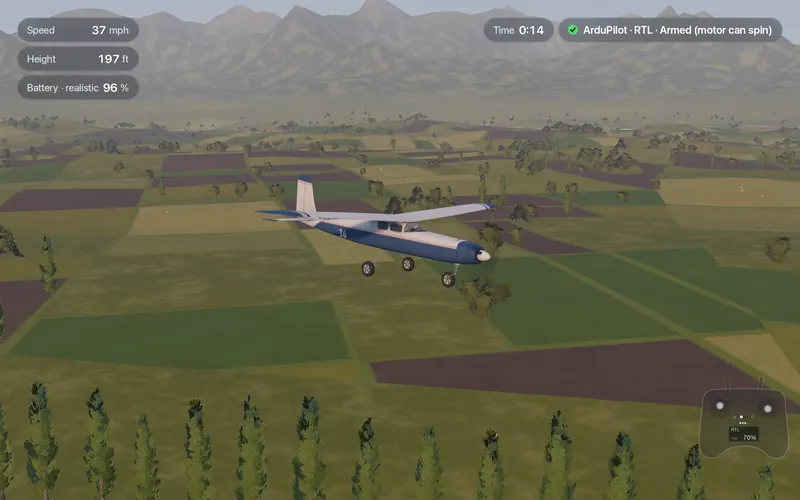
Fly Before runs the same ArduPlane 4.7 SITL, built for Apple Silicon, as a separate free helper. The simulator provides the physics over ArduPilot's JSON interface, and you never touch a compiler.
- Download the ArduPilot helper next to the app.
- In Settings, Connections, turn on Fly with ArduPilot. The app starts ArduPilot with the parameter file for your plane and stops it when you finish, even if the app quits unexpectedly.
- Arm with throttle down and rudder full right for three seconds, then fly FBWA, AUTO, RTL or LOITER from a six-position mode switch.
- Connect QGroundControl over UDP 14550 or TCP 5760.
FBWA, RTL, automatic takeoff and landing, AUTO missions, radio, battery and geofence failsafes and the QuadPlane transition pass our automated test runs against ArduPlane 4.7.2 SITL, and all 43 aircraft fly under it.
Limits: the helper runs on Apple Silicon only. The flight model estimates inertia, so do not copy PID gains tuned in any simulator straight to your plane. Fly Before is not affiliated with or endorsed by the ArduPilot project.
Questions
Is there a ready-made ArduPilot SITL binary for macOS?
Not on ArduPilot's firmware server when we checked: it offers SITL builds for Windows (for Mission Planner) and Linux, not macOS. On a Mac you build it from source or use an app that ships it.
How long does building ArduPlane SITL take on an Apple Silicon Mac?
In our build, about four minutes for ./waf plane after configuring with --board sitl.
Does SITL fly a plane by itself?
No. SITL is the autopilot software. It needs a physics model to fly: ArduPilot's built-in simple models, or an external simulator connected over its JSON or other backends.
Fly Before: RC Flight Simulator is a native macOS app (Apple Silicon) for flying RC planes and fixed-wing VTOLs that runs real ArduPilot in one click through the free ArduPilot Helper. One-time purchase, not on sale yet.
Sources
- ArduPilot SITL builds on the firmware server: Tools/MissionPlanner/sitl, Plane/stable
- ArduPilot: SITL simulator, Setting up the build environment on macOS
- Forum: Bad instruction on SITL on macOS M4, SITL error on macOS Monterey
- ArduPilot source: Plane-4.7.2 tag
Changelog
- : First published.