What do the ArduPilot plane flight modes actually do?
Each mode decides who flies which axis. In MANUAL you fly everything and the autopilot passes your sticks through. In FBWA it holds the wings and pitch within limits while you steer and set the throttle. TAKEOFF, AUTO, RTL and LOITER hand the flying to the autopilot: climb out, follow the mission, come home, or circle where you are. Know what each one does before you put it on a switch.
Fly Before is the RC flight simulator for Mac that runs real ArduPilot in one click. Plug in your radio and practice every step on your Mac before you go to the field. See what Fly Before does
ArduPlane has more than twenty modes. A typical fixed-wing setup uses five or six of them on a single switch, and most surprises on a first ArduPilot flight come from flipping into a mode without being sure what it will do. Below are the six on Fly Before's default mode switch, in the order they sit there, with what you and the autopilot each control.
The six modes on the switch
| Mode | You control | The autopilot controls | Use it for |
|---|---|---|---|
| FBWA | Bank and pitch with the sticks (within limits), throttle, rudder | Levels the wings and pitch when you let go | Hand flying with a safety net; takeoff and landing |
| TAKEOFF | Nothing, until you switch out | Climbs out to a set height, then circles | Repeatable climb-outs |
| AUTO | Nothing (you can still take over) | Flies the uploaded mission, including takeoff and landing items | Survey, mapping, long routes |
| RTL | Nothing | Flies home or to a rally point and circles | Lost orientation, failsafe |
| LOITER | Nothing | Circles the point where you switched it on | A pause to think |
| MANUAL | Everything | Nothing; your sticks go straight to the servos | The way out when something is wrong |
TAKEOFF, AUTO, RTL and LOITER need a GPS position. Other modes you may meet: FBWB, where the autopilot also holds height and speed, and CRUISE, which adds holding a ground track. The full list is in the ArduPilot Plane documentation.
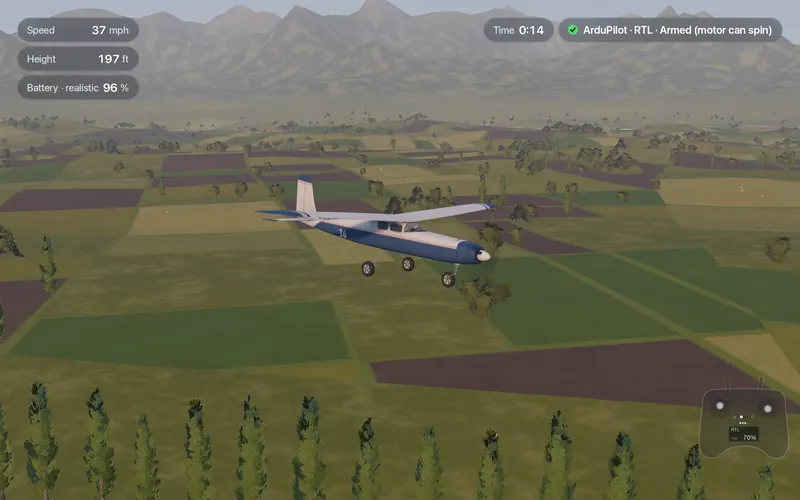
Rehearse each mode before the maiden
- Arm with throttle down and rudder full right for a few seconds, the way ArduPilot expects on the field.
- FBWA first. Take off and fly circuits. Let go of the sticks and watch it level. Check the bank and pitch limits feel right.
- LOITER, then back. Switch in at height, watch the circle, switch back to FBWA.
- RTL from far out. Fly away, switch to RTL and see where it goes and at what height it circles.
- AUTO with a short mission. Takeoff, a few waypoints and a landing; watch it in QGroundControl or Mission Planner.
- MANUAL as the exit. Practice flipping to MANUAL in a turn and recovering by hand. That reflex is what saves real planes.
How Fly Before helps
Fly Before runs the real ArduPlane 4.7 as SITL next to the simulator, in one click, through a free helper. The default mode switch is 1 FBWA, 2 TAKEOFF, 3 AUTO, 4 RTL, 5 LOITER, 6 MANUAL, and four ArduPilot lessons cover What is FBWA?, Return home (RTL), Radio loss (failsafe) and an Automatic mission. The Mission page loads a mission file and checks it before you fly AUTO; the Failsafe page lets you cut the radio, drain the battery or cross the fence in flight and watch what ArduPilot does. Automatic takeoff, missions, landing and the radio, battery and geofence failsafes are tested on the Trainer and the Explorer.
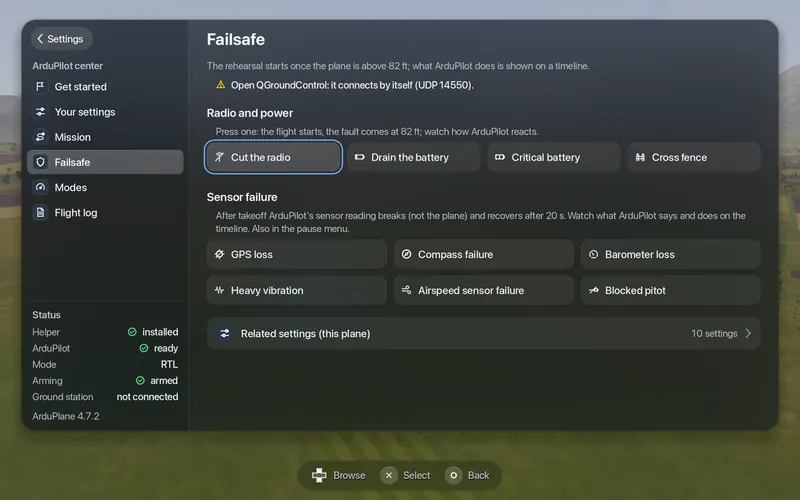
Do not tune your PIDs here. The flight model estimates the aircraft's inertia, so gains that fly well in the simulator will not carry over reliably. Use SITL to learn modes, missions and failsafes, and tune on the real plane. Fly Before is independent and not affiliated with or endorsed by the ArduPilot project.
Questions
Which ArduPilot mode should I take off in?
Many pilots hand-launch or take off in FBWA, where the autopilot keeps the wings level and limits the pitch while you keep the throttle. TAKEOFF mode climbs out on its own to a set height and then circles. Whatever you choose, keep MANUAL on the switch as the way out if the autopilot does something unexpected.
What is the difference between FBWA and FBWB?
In FBWA the stick sets bank and pitch within limits and you control the throttle. In FBWB the autopilot holds height and speed: the stick still sets bank, but the elevator stick changes the target height and the throttle stick the target speed. FBWB needs GPS and an airspeed or speed estimate.
What does RTL do in ArduPlane?
It flies back to home or the nearest rally point and circles there at the return height. It does not land on its own unless the plane is set up for an automatic landing. RTL is also the usual action when the radio link is lost for long enough.
Fly Before: RC Flight Simulator is a native macOS app (Apple Silicon) for flying RC planes and fixed-wing VTOLs that runs real ArduPilot in one click through the free ArduPilot Helper. One-time purchase, not on sale yet.
Sources
- ArduPilot Plane documentation: Flight modes
- Fly Before mode switch, lessons and ArduPilot pages: our user guide and ArduPilot page
Changelog
- : First published.