How do you learn ArduPilot QuadPlane without hardware?
Run ArduPlane SITL with QuadPlane enabled and a physics model of a VTOL, then work through the Q modes in order: hover, loiter, transition to forward flight, and back. You learn the parameter names, the mode switch and the transition logic before you buy a single motor.
Fly Before is the RC flight simulator for Mac that runs real ArduPilot in one click. Plug in your radio and practice every step on your Mac before you go to the field. See what Fly Before does
QuadPlane is ArduPlane's support for fixed-wing VTOLs: aircraft that take off and land on lift motors and cruise on a wing. The setup has more moving parts than a normal plane (extra motors, tilt servos, a second set of modes, transition logic), and mistakes tend to happen close to the ground. A simulator lets you meet the parameter list and the sequence first.
Key ideas in five lines
Q_ENABLE = 1turns on QuadPlane. After a parameter refresh, hundreds ofQ_parameters appear; in our SITL build the full list grew from 1,356 to 1,576.- Frame and tilt. A "quad plane" has fixed lift motors; a tilt-rotor tilts some motors forward for cruise. Tilt-rotors are set with
Q_TILT_*parameters;Q_TILT_TYPEchooses continuous, binary or vectored tilt. - Q modes fly on the lift motors: QSTABILIZE, QHOVER, QLOITER, QLAND, QRTL.
- Fixed-wing modes (FBWA, CRUISE, AUTO, RTL) fly on the wing; entering one from hover starts the transition.
- Transition is complete when the plane reaches its minimum airspeed or the transition timer (
Q_TRANSITION_MS) runs out.
Q modes at a glance
| Mode | What it holds | Use it for |
|---|---|---|
| QSTABILIZE | Attitude only; you manage throttle | Manual hover practice |
| QHOVER | Attitude and altitude | First take-offs and hovering |
| QLOITER | Attitude, altitude and position (GPS) | Hands-off hover, checking drift |
| QLAND | Vertical descent and landing | Landing on the lift motors |
| QRTL | Return home, then land vertically | Recovery and failsafe practice |
A practice sequence
- Read the parameter list. Connect QGroundControl and look through the
Q_groups: motors (Q_M_), tilt (Q_TILT_), landing (Q_LAND_), assistance (Q_ASSIST_). Note names that changed between versions; for example ArduPlane 4.7 usesQ_LAND_FINAL_SPDwhere older guides sayQ_LAND_FINAL_SPEED. - Check the outputs. On the ground in QSTABILIZE, unarmed then armed, confirm each lift motor and tilt servo moves the way the frame expects. In SITL this is where wrong servo functions show up harmlessly.
- Hover in QHOVER. Take off, hold a height of a few meters, land. Repeat until throttle and yaw feel calm.
- Hover in QLOITER. Let go of the sticks and watch it hold position. Add wind if your simulator allows.
- Transition. From a steady hover at a safe height, switch to FBWA or CRUISE. Keep the wings level and watch airspeed build as the motors tilt.
- Come back. Switch to QHOVER or QRTL, slow down, and land vertically. Then practice QRTL from a distance.
SITL settings that trip people up
- Loop rate. QuadPlane raises ArduPlane's main loop to 300 Hz, and a pre-arm check wants the gyro rate above 1.8 times the loop rate. With the physics rate (
SIM_RATE_HZ) at 400 Hz our VTOL would not arm; at 1200 Hz it did. - Hover throttle.
Q_M_THST_HOVERis the average motor command in hover.Q_M_HOVER_LEARNcan learn it in flight, but the starting value should be close. - Battery voltage. Hover current is high; if the simulated pack sags below your low-voltage setting, a battery failsafe can trigger in hover. Check
Q_M_BAT_VOLT_MAXandMINand the battery failsafe values for your pack.
Doing this in Fly Before
Fly Before includes a three-motor tilt-rotor VTOL with a vectored-tilt ArduPilot parameter file (Q_TILT_TYPE 2) and runs it on ArduPlane 4.7 QuadPlane code. The mode switch maps to QHOVER, QLOITER, FBWA, QRTL, QLAND and CRUISE. Our automated runs take off in QHOVER, hover, switch to QLOITER, transition to FBWA, fly hands-off, turn and land with QRTL, in calm air and in gusts.
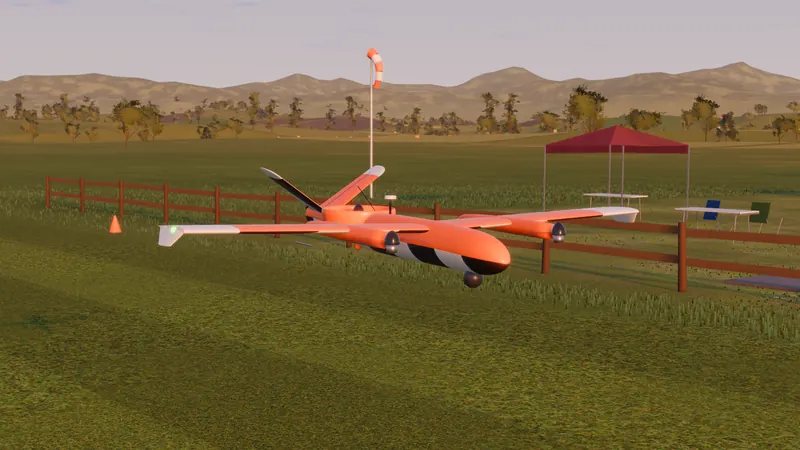
What a simulator will not tell you: your real airframe's inertia, motor response and vibration. Fly Before's model estimates inertia, so use it for the sequence, the modes and the parameter names. Do the tuning (including Q_AUTOTUNE) on the real aircraft, following ArduPilot's QuadPlane documentation.
Questions
Why will my QuadPlane SITL not arm?
One cause we hit: QuadPlane raises the main loop to 300 Hz, and a pre-arm check wants the gyro rate above 1.8 times the loop rate. With the simulator's physics rate at 400 Hz it would not arm; at 1200 Hz it did. Read the pre-arm message in your ground station first.
Which mode should my first VTOL take-off use?
QHOVER is the usual starting point: it holds attitude and altitude while you control position. Move to QLOITER, which also holds position with GPS, once hover is comfortable.
Fly Before: RC Flight Simulator is a native macOS app (Apple Silicon) for flying RC planes and fixed-wing VTOLs that runs real ArduPilot in one click through the free ArduPilot Helper. One-time purchase, not on sale yet.
Sources
- ArduPilot: QuadPlane support, QuadPlane flight modes, Tilt-rotor planes
- ArduPilot source: tiltrotor.cpp, quadplane.cpp
Changelog
- : First published.