How do you practice a VTOL transition before the maiden?
Break it into four drills and do them in order in a simulator: hover, move in hover, transition to forward flight, back-transition and vertical landing. Repeat each until it is boring, then do the same sequence with your flight controller's modes. The transition is short, but it is where most VTOL builds get damaged.
Fly Before is the RC flight simulator for Mac that runs real ArduPilot in one click. Plug in your radio and practice every step on your Mac before you go to the field. See what Fly Before does
A fixed-wing VTOL spends a few seconds in the transition: too slow for the wing to carry it, with the lift motors tilting forward or handing over to a pusher. Height loss there, close to the ground, is the classic first-flight crash. The good news is that the transition is a procedure, and procedures can be rehearsed.
The drill plan
| Drill | Goal | Done when |
|---|---|---|
| 1. Hover | Take off and hold a spot and a height | 15 seconds inside a small area without chasing the sticks |
| 2. Move and turn in hover | Translate slowly, then yaw to face yourself | Point to point without losing height; nose-in hover feels calm |
| 3. Transition to forward flight | Build airspeed while the motors tilt | Level, no height loss, flying a straight line afterwards |
| 4. Back-transition and landing | Slow down, return to hover, land vertically | Touchdown inside a marked box |
Technique notes
- Start high. Begin each transition with enough height to lose some and still recover. In the sim, notice how much height you drop on a bad one; that is your margin at the field.
- Into the wind. Transition into wind: airspeed builds sooner and you cover less ground.
- Throttle up, nose level. The common mistake is easing off throttle or letting the nose drop as the motors tilt. Hold power and attitude until the wing is flying.
- Commit or abort early. Decide your abort action before you start (back to hover) and practice it.
- Back-transition slowly. Bleed off speed before returning to hover; the lift motors have to catch the weight.
- Watch the battery. Hover draws far more current than cruise. The Workshop shows hover current and hover time for your setup, so you know how long you can hang around.
With ArduPilot QuadPlane
If your real VTOL runs ArduPilot, the autopilot flies the transition, and the useful rehearsal is the mode sequence. In Fly Before the tilt-rotor's six-position mode switch maps to:
| Position | 1 | 2 | 3 | 4 | 5 | 6 |
|---|---|---|---|---|---|---|
| Mode | QHOVER | QLOITER | FBWA | QRTL | QLAND | CRUISE |
- Arm and take off in QHOVER. Climb to a safe height.
- Switch to QLOITER and let go: the plane should hold position.
- Switch to FBWA: ArduPilot runs the transition. Watch airspeed and height.
- Fly a circuit, then switch to QRTL and watch it come home and land vertically.
This sequence (QHOVER take-off, hover, QLOITER, transition to FBWA, hands-off flight, a turn, QRTL landing) passes our automated runs on ArduPlane 4.7, in calm air and in gusts.
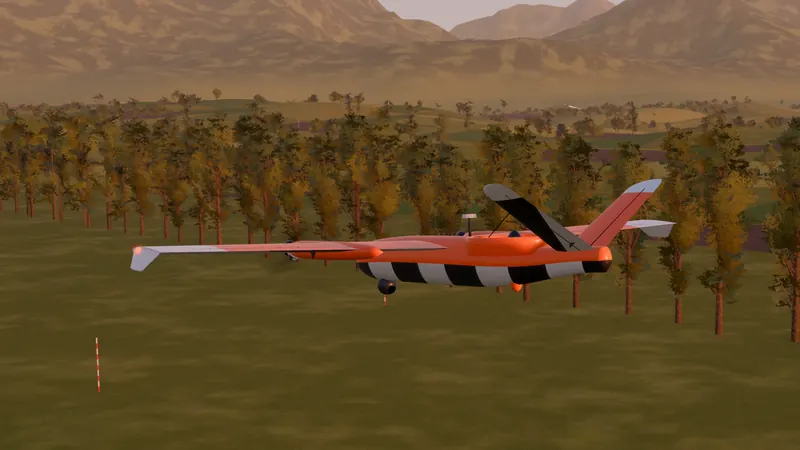
The four VTOL lessons in Fly Before
- Hover: take off and hover inside a marked pillar for 15 seconds.
- Move and turn in hover: go from pillar to pillar, then turn the nose toward you at the last one.
- Go forward flight: from hover, press the transition button and fly through the rings.
- Back-transition and landing: return to hover, slow down and land in the box.
Each lesson has one goal and three stars. When a transition goes wrong, rewind five seconds and try it again from just before the mistake.
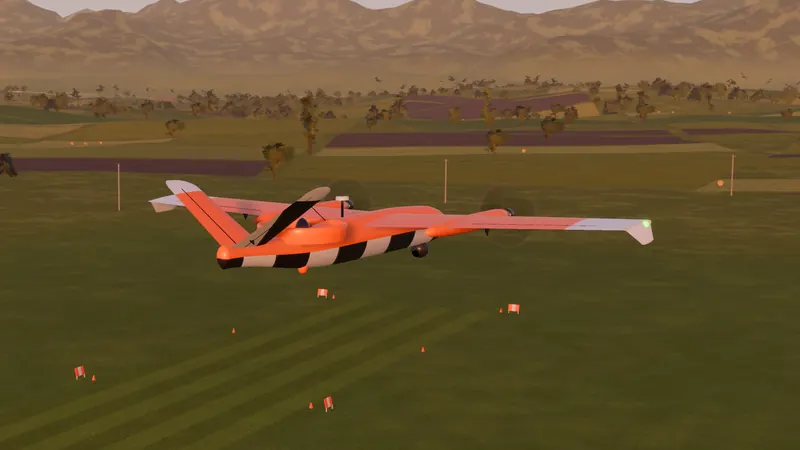
Limits: the simulator models a tilt-rotor from its components, but it will not fly exactly like your build. Hand launches, gusty hover and battery sag under hover current are where real VTOLs surprise people. Use the sim for the sequence and the stick work, then fly the real one on a calm day, high enough to recover.
Questions
What usually goes wrong in a VTOL transition?
The plane loses height while it is too slow for the wing and the lift motors are tilting away. Keep throttle up and the nose level through the transition, and start it high enough to recover.
Should I practice transitions by hand or with ArduPilot?
Both, if your real plane runs ArduPilot. By hand you learn what the aircraft does; with ArduPilot QuadPlane you learn what your modes and parameters do, which is what will fly the real transition.
Fly Before: RC Flight Simulator is a native macOS app (Apple Silicon) for flying RC planes and fixed-wing VTOLs that runs real ArduPilot in one click through the free ArduPilot Helper. One-time purchase, not on sale yet.
Sources
- ArduPilot: Flying a QuadPlane, QuadPlane flight modes, Tilt-rotor planes
Changelog
- : First published.