RadioMaster and other EdgeTX radios on a Mac
Yes, a RadioMaster works with an RC simulator on a Mac. EdgeTX radios (RadioMaster TX16S, TX15, Boxer, Pocket, Zorro and many more) act as a standard USB joystick. macOS reads them without a driver, and Fly Before has a built-in profile for their documented layout.
Short answer
| Works on macOS | Yes, over USB as "USB Joystick (HID)" |
|---|---|
| Badge in Fly Before | Checked against the docs |
| Tried with a real radio | RadioMaster TX15 and PS5 DualSense, on a MacBook Air M4 |
| USB ID and name | 1209:4F54. Because EdgeTX reports "OpenTX" as the manufacturer, a TX15 appears as "OpenTX RadioMaster TX15 Joystick". |
| Channel order | AETR by default (aileron, elevator, throttle, rudder) |
| Bluetooth | Only through an ExpressLRS BLE joystick mode; can drop. Use USB. |
Set it up in five steps
- Use a USB cable that carries data. Many phone-charging cables do not.
- Plug the radio into the Mac. In the menu that appears on the radio, choose USB Joystick (HID).
- In the model settings, keep the USB joystick mode on Classic. In Classic mode CH1–8 become axes and CH9–32 become buttons.
- Use a simple model memory with plain 100% channels. Expo, rates and mixes in the model change what the sim receives.
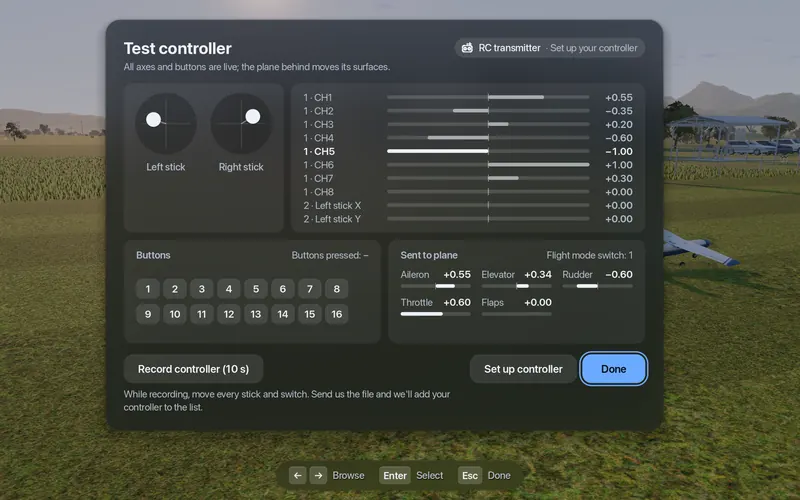
- In Fly Before open Settings, Connections, Test. Move each stick: the bars should follow. If the throttle bar sits in the middle before you touch it, move the throttle once.
Known pitfalls, with causes
The radio does not show up at all
The USB mode is set to storage or "ask", or the cable only charges. Choose USB Joystick (HID) and try another cable.
Two axes are missing in Advanced mode
In Advanced mode you can give a channel the "Sim Aileron" or "Sim Elevator" axis type. macOS (through SDL) ignores those two types. Use Classic mode, or plain X, Y, Z and similar types. Radios with less than 1 MB of flash, such as the TX12 MK2 and the Pocket, have no Advanced mode anyway.
Axes changed after updating EdgeTX
EdgeTX 2.11.0 to 2.12.2 changed the classic USB joystick layout; 2.12.3 restored it. If your axes moved after an update, update to 2.12.3 or later. Fly Before's saved settings for your radio survive firmware updates, because we leave the firmware version out of the device key.
Throttle looks like half throttle at the start
macOS reports nothing for an axis until it first moves. Fly Before keeps throttle at zero and asks you to move it once.
Sticks are in the wrong places
Your radio's default channel order may not be AETR, or a model mixes channels. Run Set up controller; the wizard learns each stick.
Device guides
- RadioMaster Pocket simulator setup on Mac
- RadioMaster TX16S simulator setup on Mac
- EdgeTX USB joystick on Mac: fix missing or inverted axes
Sources
- EdgeTX source, USB joystick: usb_joystick.cpp, usbd_desc.c
- EdgeTX manual: Configure advanced joystick with EdgeTX
- Layout change and fix: EdgeTX #6320, EdgeTX #7532; Advanced mode on small-flash radios: EdgeTX #5443
- macOS joystick handling: SDL_iokitjoystick.c; untouched axis reads 0: Godot #105676