How do I use a RadioMaster Pocket as a simulator controller on a Mac?
Plug the Pocket into your Mac with a USB cable that carries data and pick USB Joystick (HID) on the radio. macOS reads it as a standard joystick with no driver. Keep the model's USB joystick mode on Classic, fly with a plain model memory, and move the throttle once before the first flight.
Fly Before is the RC flight simulator for Mac that runs real ArduPilot in one click. Plug in your radio and practice every step on your Mac before you go to the field. See what Fly Before does
The Pocket runs EdgeTX, and every EdgeTX radio exposes the same documented USB joystick layout. That makes it one of the easier radios to use with a simulator on macOS. The steps below work for any RC simulator that reads standard HID joysticks; the notes about badges and the setup wizard are specific to Fly Before.
At a glance
| Works on macOS | Yes, over USB as "USB Joystick (HID)"; no driver needed |
|---|---|
| USB ID | 1209:4F54 (shared by EdgeTX and OpenTX radios) |
| Name on the Mac | Starts with "OpenTX", because EdgeTX reports "OpenTX" as the USB manufacturer string |
| Joystick mode | Classic only. The Pocket has less than 1 MB of flash, so EdgeTX leaves Advanced mode out |
| Channel order | AETR by default (aileron, elevator, throttle, rudder) |
| Channels as axes | CH1–8 become axes; CH9–32 become buttons |
| Badge in Fly Before | Checked against the docs |
| Tried on real hardware | The same EdgeTX profile, on RadioMaster TX15 and PS5 DualSense |
Set it up in six steps
- Check your firmware. On the radio, open the system menu and note the EdgeTX version. If it is between 2.11.0 and 2.12.2, consider updating to 2.12.3 or later (see "Axes moved after an update" below).
- Use a data cable. Many USB-C cables that came with a phone or power bank only charge. If the Mac never sees the radio, try another cable before anything else.
- Plug in and choose USB Joystick (HID). When you connect the cable, EdgeTX asks what the USB port should do. Choose the joystick option, not storage or serial.
- Make a sim model memory. Create a new model with plain 100% channels: no expo, no dual rates, no mixes. Anything in the model memory changes what the simulator receives.
- Keep the USB joystick mode on Classic. On the Pocket this is the only mode, which is fine: Classic is the layout macOS reads cleanly.
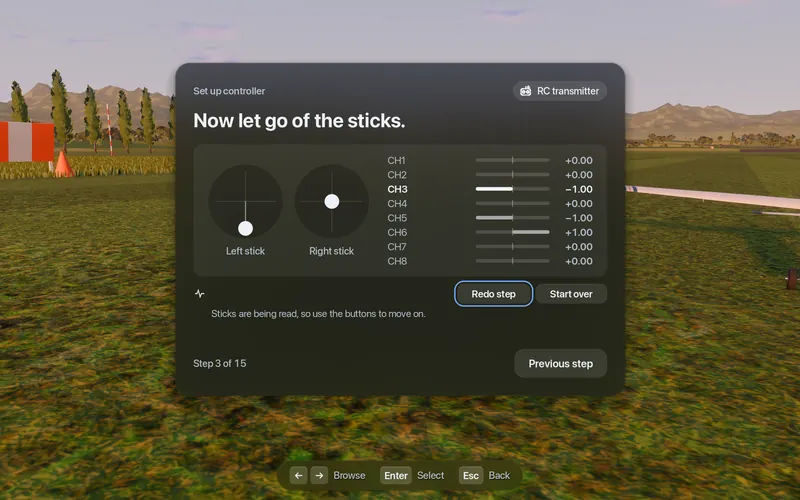
- Test before you fly. In Fly Before, open Settings, Connections, Test and move each stick. Then move the throttle once from bottom to top and back.
Why "move the throttle once"
On macOS, a joystick axis reports nothing until it first moves. The game library underneath most Mac games (SDL) and the engine Fly Before is built on (Godot) then read that axis as zero, which is the middle of the range. A throttle stick parked at the bottom therefore looks like half throttle. Fly Before treats an axis that has never moved as unknown, keeps throttle at zero and shows "Move the throttle once". Other simulators may not do this, so make it a habit.
Known problems and fixes
| Symptom | Likely cause | Fix |
|---|---|---|
| Mac does not see the radio | Charge-only cable, or USB mode set to storage | Different cable; choose USB Joystick (HID) |
| Throttle at half before you touch it | Untouched axis reads as zero on macOS | Move the throttle once |
| Aileron moves the rudder | Channel order differs from what the sim expects, or a mix in the model | Plain model memory; run the setup wizard |
| A stick works backwards | Channel reversed in the model | Remove the reverse in the sim model, or set "reverse" in the simulator |
| Axes moved after an update | EdgeTX 2.11.0–2.12.2 changed the Classic layout | Update to 2.12.3 or later |
Axes moved after a firmware update
EdgeTX 2.11.0 changed the Classic USB joystick descriptor, and 2.12.3 restored the old one. The pull request author reported that macOS was not affected, but if your sticks land on different axes after an update, 2.12.3 or later is the fix. Separately, EdgeTX writes its firmware version into the device identifier that macOS games see, so that identifier changes after every update. Fly Before leaves the version out when it saves your settings, so your calibration is found again after an update.
Pocket over Bluetooth (ExpressLRS)
If your Pocket has an ExpressLRS module, the ELRS Lua script can switch it to BLE Joystick. Pair it in the macOS Bluetooth settings. Two caveats from the ExpressLRS issue tracker and source: the radio link is off while BLE Joystick is on, and the Bluetooth joystick is known to drop after about 30 seconds on some macOS versions. The channel order over BLE also differs from USB (and changed between ELRS 3.x and 4.x). Fly Before has a profile for both versions, but we recommend USB.
What we have and have not checked: the Pocket's USB layout comes from EdgeTX source code and its manual, which is why Fly Before shows the badge "Checked against the docs". The Pocket runs the same EdgeTX firmware and USB layout as the other radios in that profile. Tried on real hardware: RadioMaster TX15 and PS5 DualSense.
Questions
Does the RadioMaster Pocket work on a Mac?
Yes, as a standard USB joystick. Plug it in with a data cable and choose USB Joystick (HID) on the radio. macOS needs no driver. In Fly Before it matches the built-in EdgeTX profile, shown as Checked against the docs. If it behaves differently, send a 10-second recording from Test controller and we add it in an update.
Why is there no Advanced joystick mode on my Pocket?
EdgeTX leaves Advanced USB joystick mode out of radios with less than 1 MB of flash, and the Pocket is one of them. Classic mode is the one you want on a Mac anyway.
Can I use the Pocket over Bluetooth instead?
With ExpressLRS you can switch the internal module to its BLE Joystick mode and pair it in the macOS Bluetooth settings. The radio link is off in that mode, and the Bluetooth joystick is known to drop after about 30 seconds on some macOS versions, so USB is the safer choice.
Fly Before: RC Flight Simulator is a native macOS app (Apple Silicon) for flying RC planes and fixed-wing VTOLs that runs real ArduPilot in one click through the free ArduPilot Helper. One-time purchase, not on sale yet.
Sources
- EdgeTX USB joystick code: usb_joystick.cpp, USB descriptor: usbd_desc.c
- EdgeTX manual: Configure advanced joystick with EdgeTX
- No Advanced mode on small-flash radios: EdgeTX #5443
- Classic descriptor change and fix: EdgeTX #6320, EdgeTX #7532
- Untouched axis reads zero: Godot #105676
- ExpressLRS BLE joystick: devBLE.cpp, macOS drop report: ExpressLRS #2275
Changelog
- : First published.