How do you practice RC plane landings on a simulator?
Practice the approach, not just the touchdown. Fly the same circuit every time, turn onto a long straight final into the wind, reduce power so the plane descends at a steady rate, close the throttle over the runway and ease back in the last few feet. Repeat until three landings in a row are on the runway, then add crosswind and engine-out landings.
Fly Before is the RC flight simulator for Mac that runs real ArduPilot in one click. Plug in your radio and practice every step on your Mac before you go to the field. See what Fly Before does
Landings are where most beginner planes get broken, and they are also the part you get to practice least at the field: one flight, one landing. On a simulator you can fly twenty approaches in an evening. The trick is to fly them the same way every time, so you learn what a good one looks like.
The landing drill
- Fly a fixed circuit. Downwind leg parallel to the runway at a constant height, a base turn, then a final turn that leaves you lined up well before the runway.
- Slow down on downwind. Bring the throttle back so the plane is slower but still well above its stall, before you turn base.
- Descend on final with the throttle. Use power to set the rate of descent and the elevator to hold a steady attitude. If you are low, add a little power rather than pulling up.
- Close the throttle over the runway. Not before the threshold, unless you are practicing a glide.
- Flare. In the last few feet, ease the stick back gradually so the plane levels off and settles. Do not push forward at touchdown.
- Hold it on the runway. Keep straight with rudder until it stops, then review what happened.
Use the aids, then take them away
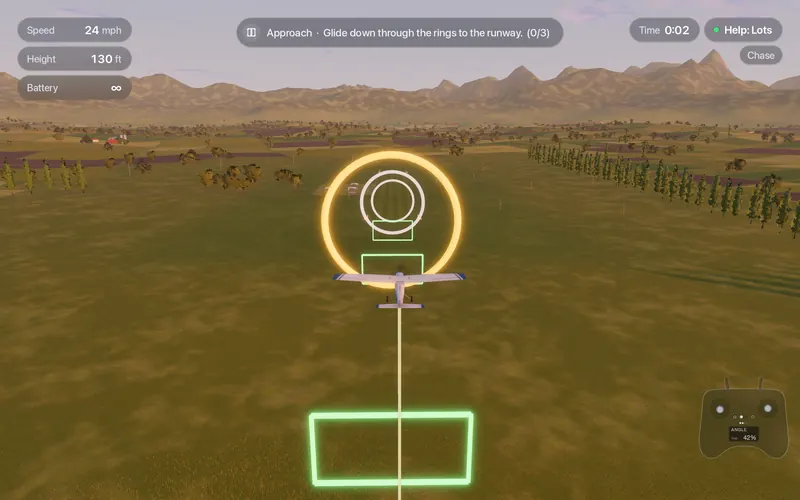
Fly Before draws glide-path gates and a runway arrow on approach when help is on Lots or Some, and always in the lessons. They show what a steady final looks like. On Lots, the help also lifts the nose in the last few meters when the throttle is closed, so you see a good flare before you fly one yourself. Once the gates feel easy, switch help to Off and fly the same approach without them.
Read the result, not just the stars
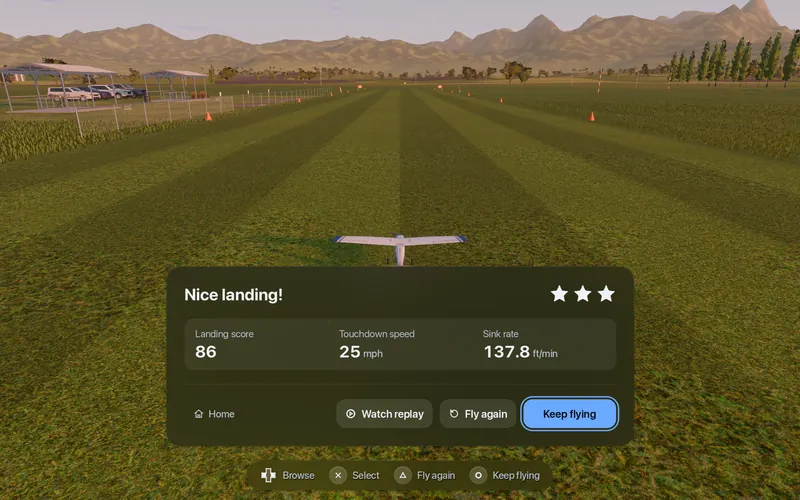
After each touchdown Fly Before shows a landing card with a score, the touchdown speed and the sink rate, and a hint when something went wrong: "You bounced: come in slower, don't push the stick at touchdown", or "Hard touchdown: lift the nose just a little in the last meter". Watch replay shows the approach again. Two numbers to track over a session:
- Touchdown speed going down means you are slowing earlier and flaring better.
- Sink rate going down means the flare is gradual instead of late.
Then make it harder
| Step | Set up | Goal |
|---|---|---|
| 1 | Calm, help Some, the gates on | Three landings in a row on the runway |
| 2 | Calm, help Off | The same, no gates |
| 3 | Breezy, wind direction across the runway, or the Crosswind lesson | No drift off the side at touchdown |
| 4 | Pilot view: watch from the ground like at the field | Judge height the way you will at the field |
| 5 | The Dead-stick landing lesson | Glide back and land with no motor |
| 6 | Gusty, a faster plane | Extra speed on approach, a firm decision to go around |
Go-arounds are a skill too. If the approach is wrong, add power, climb straight ahead and fly the circuit again. Practicing that on the simulator makes it a habit instead of a last-second panic.
What a simulator cannot teach about landings: judging height over a real runway with the sun in your eyes, a bumpy grass strip, and how your own plane floats in ground effect. Our model is built from components and will not land exactly like your aircraft. Practice the sequence here; let the real field fine-tune it.
Questions
Why does my RC plane bounce when it lands?
Usually it arrives too fast, or the stick is pushed forward at touchdown. Come in slower and straighter, close the throttle over the runway, and in the last few feet ease back a little so the plane settles instead of being flown into the ground.
Should I land with or without power?
Most trainers land best with the throttle closed over the runway and a little power available on the approach to control the descent. Practice both: powered approaches for control, and dead-stick landings for the day the motor stops.
Which direction should I land in?
Into the wind. It lowers your speed over the ground, shortens the landing and makes the approach steadier. In a crosswind, keep the nose pointed slightly into the wind and use rudder to straighten up just before touchdown.
Fly Before: RC Flight Simulator is a native macOS app (Apple Silicon) for flying RC planes and fixed-wing VTOLs that runs real ArduPilot in one click through the free ArduPilot Helper. One-time purchase, not on sale yet.
Sources
- Fly Before landing aids, landing card and lessons: our user guide and the Learn page
- Academy of Model Aeronautics, clubs and instruction: modelaircraft.org
Changelog
- : First published.