How do I learn to fly an RC plane on a simulator?
Practice in short sessions with one goal each: first orientation and gentle turns, then circuits, then approaches and landings, then wind and failures. Reduce the assistance as you go. When you can land several times in a row with assists off, including with the plane flying toward you, fly your first real flights with an experienced pilot.
Fly Before is the RC flight simulator for Mac that runs real ArduPilot in one click. Plug in your radio and practice every step on your Mac before you go to the field. See what Fly Before does
Most beginner crashes come from a handful of skills: losing orientation when the plane turns toward you, overcontrolling, flying too slowly in a turn, and landings. A simulator lets you repeat those moments dozens of times in an evening. Below is a ten-hour plan; how many hours you really need before the field is covered in how many simulator hours before your first flight. The plan works in any RC simulator; where we mention a lesson or setting by name, it is from Fly Before.
Before hour one
- Use the controller you will fly with if you have it. A USB radio builds the right muscle memory. A gamepad is fine to start; see gamepads for RC sims.
- Pick a trainer: a high-wing plane that flies slowly and is forgiving.
- Calm weather, full assistance. In Fly Before, help level Lots levels the plane when you let go and will not let you stall or dive.
- Sessions of 20 to 30 minutes. Stop when you start making the same mistake repeatedly.
The ten-hour plan
| Hours | Goal | Fly Before lessons | Done when |
|---|---|---|---|
| 1 | Straight and level, gentle turns, small inputs | Fly straight, Turn | You can hold height through a full circle |
| 2 | Orientation: the plane flying toward you | Flying toward you | No more "reversed" panics on the inbound leg |
| 3 | Circuits in both directions | Traffic pattern | A rectangle around the field, left and right hand |
| 4 | Approach: line up, slow down, descend | Approach | Stable approach to the runway threshold |
| 5 | Landing and flare | Landing | Three landings in a row on the runway |
| 6 | Takeoff, then reduce help to Some | Takeoff | Takeoff, circuit, landing without help stepping in |
| 7 | Stalls and slow flight | Spot and fix a stall | You recognize a stall and recover with height to spare |
| 8 | Wind | Crosswind | Landings in a crosswind without drifting off the runway |
| 9 | Failures | Dead-stick landing; motor cut, battery running out, stuck servo, radio link lost, sudden gust | You land the plane after a motor cut |
| 10 | Full flights with help Off; rehearse your first real flight | First flight with the Explorer (checklist rehearsal) | Five clean flights in a row |
The skill that matters most: orientation
Stick inputs are relative to the plane, not to you. Flying away from you, right stick means right. Flying toward you, the plane's right is your left. Two habits help:
- "Stick to the low wing." When the plane is coming toward you and a wing drops, move the stick toward the low wing to pick it up.
- Turn your body. Some pilots imagine sitting in the plane, or physically turn to face the direction of flight.
Fly Before shows a short "Coming at you: left-right swapped" hint while you learn, and an arrow at the screen edge points to the plane when it leaves the view.
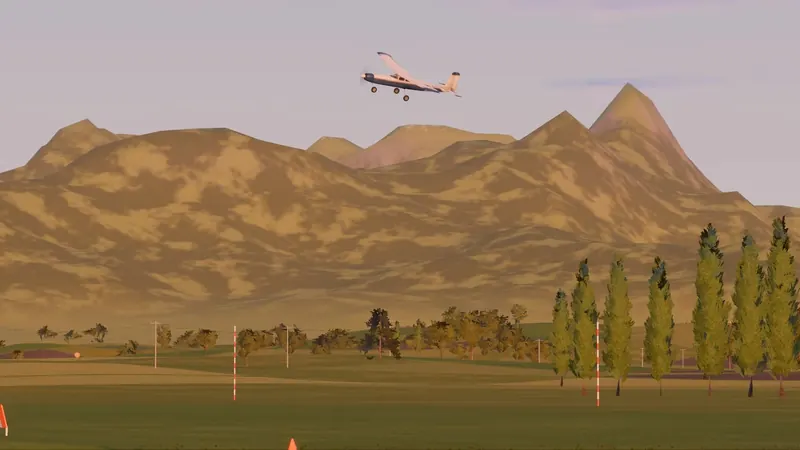
Use rewind instead of restarting
The expensive part of learning is the few seconds before a crash. Fly Before's five-second rewind puts you back just before the mistake, so you can fly the same moment again. Restarting the whole flight teaches the takeoff ten times and the problem once.
Wind and thermals
Calm-air practice builds confidence; wind builds skill. Add a light crosswind after hour seven. Land into the wind, keep some extra speed on approach, and correct drift with the rudder and ailerons rather than chasing the runway at the last second. On help level Lots Fly Before flies faster in strong wind so the plane is not blown backwards; on Off that is your job.
What a simulator cannot teach: the feel of a real hand launch, real gusts near trees and buildings, your own plane's exact handling, and the nerves of the first real flight. Our physics model is built from components and will not fly exactly like your plane. Use the simulator to make the basics automatic, then let an experienced pilot help with the rest.
Your first real flight
- Find a club or an instructor. In the US, the Academy of Model Aeronautics (modelaircraft.org) lists chartered clubs, and many clubs offer buddy-box training.
- Fly the same kind of plane you practiced with, on a calm day.
- Go through a checklist before the flight. Ours is in the maiden flight checklist.
- Keep flying the simulator between field days, especially the things that went wrong.
Questions
Why do the controls feel reversed when the plane flies toward me?
Your stick inputs are relative to the plane, not to you. When the plane faces you, its left is your right, so a roll to the plane's left moves it to your right. The usual trick is to push the stick toward the low wing to pick it up.
Fly Before: RC Flight Simulator is a native macOS app (Apple Silicon) for flying RC planes and fixed-wing VTOLs that runs real ArduPilot in one click through the free ArduPilot Helper. One-time purchase, not on sale yet.
Sources
- Fly Before lesson list and help levels: our user guide (lessons, help levels, rewind, hints)
- Academy of Model Aeronautics: modelaircraft.org
- Beginner pain points (orientation, launches, wind, landings) collected from public RC forums and video comments, summarized in our research notes, November 2026
Changelog
- : First published.