Does the Spektrum WS2000 dongle work on a Mac?
Community reports say yes: it appears on macOS as "SPEKTRUM RECEIVER" (USB ID 0483:572B) and sends your radio's channels as joystick axes. It sends no buttons and Spektrum's default channel order is TAER, so plan to map the sticks once. There is no documented axis layout, which is why the setup step matters.
Fly Before is the RC flight simulator for Mac that runs real ArduPilot in one click. Plug in your radio and practice every step on your Mac before you go to the field. See what Fly Before does
The WS2000 is a small USB dongle that binds to a Spektrum transmitter like a receiver and passes the channels to a computer, so you can fly a simulator wirelessly with the radio you already own. Questions about using it on a Mac come up again and again in simulator threads. Here is what is documented, what comes from community reports, and what we could not confirm.
What we know, and how sure we are
| Fact | Source | Confidence |
|---|---|---|
| Shows up as "SPEKTRUM RECEIVER", ID 0483:572B | A user's macOS System Report (community) | Community report |
| Bind: radio in bind mode, hold the dongle's button while plugging it in | Pairing reports and Horizon Hobby's product page | Documented |
| Sends channels only, no buttons | Community report | Community report |
| Spektrum default channel order is TAER | Spektrum NX manual | Documented |
| Axis order on macOS | No descriptor dump found | Unknown |
| Official Spektrum statement about macOS | Not found; users quote support saying there is no Apple-compatible product | Unconfirmed |
Set it up
- Put your transmitter in bind mode.
- Hold the button on the WS2000 while you plug it into the Mac. The dongle binds to the radio.
- Check it appears. In macOS System Information, under USB, look for "SPEKTRUM RECEIVER". In Fly Before, open Settings, Connections, Test.
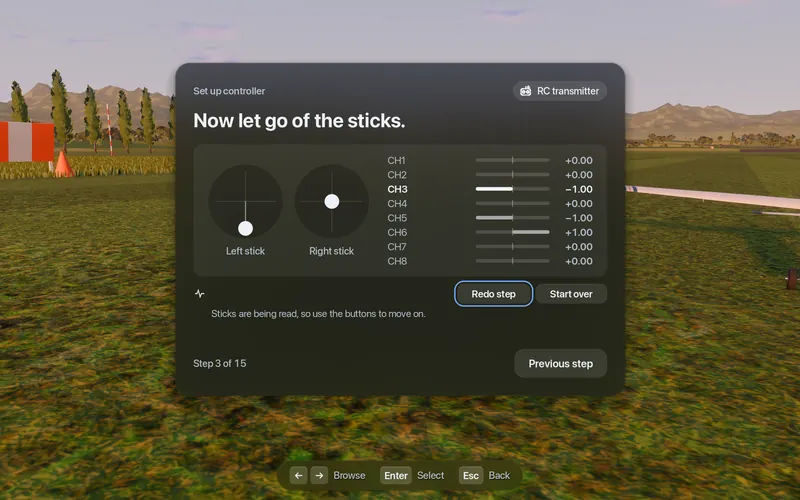
- Map the channels. In Fly Before run Set up controller: leave the sticks alone, then push aileron, elevator and rudder when asked, then throttle bottom and top. The wizard binds each function to the axis that moved most.
- Fly a plain model. Use a model memory on the radio without mixes, expo or rates while you set up, so what the simulator sees is the raw stick.
Plugging the dongle in while Fly Before is already running is fine; the app handles devices coming and going.
Why Spektrum on a Mac has a bad reputation
We looked for a single root cause for "my Spektrum dongle doesn't work on my Mac" and did not find one in any primary source. What the sources do show is a set of smaller problems that look like one big one:
- Channel order. Spektrum's TAER puts throttle on channel 1. A simulator that assumes AETR treats your throttle stick as ailerons.
- No buttons. Simulators that expect a reset or menu button on the controller get nothing from the dongle.
- Plug order. One user found the dongle only appeared after the simulator was already open.
- No Mac version of the obvious simulator. The simulator most often sold alongside Spektrum gear runs on Windows only, so Mac owners were left to experiment.
Spektrum NX and iX radios over USB instead
If you have an NX or iX radio you can skip the dongle. With AirWare 3.13B or later, set System Setup, USB Settings, Mode to Game Controller and plug the radio in with a data cable. AirWare 3.13 had this mode broken; 3.13B fixed it. Set the mode back to Inhibit when you finish. The channel order is still TAER, so map the sticks the same way.
Status in Fly Before: both the WS2000 and NX/iX radios show Set up your controller, because neither has a documented axis layout. If you own one, the app's Record controller (10 s) button saves a file we can turn into a profile.
Questions
Does the Spektrum WS2000 work on a Mac?
Community reports say it shows up on macOS as a USB device named SPEKTRUM RECEIVER with the ID 0483:572B. It sends channels but no buttons, and Spektrum's default channel order is TAER, so you need to map the sticks once in your simulator. We have not found an official Spektrum statement about macOS.
Why are my sticks swapped with the Spektrum dongle?
Spektrum radios default to TAER channel order, with throttle on channel 1, while many simulators expect AETR. Map the channels in the simulator, or in Fly Before run Set up controller and move each stick once.
Fly Before: RC Flight Simulator is a native macOS app (Apple Silicon) for flying RC planes and fixed-wing VTOLs that runs real ArduPilot in one click through the free ArduPilot Helper. One-time purchase, not on sale yet.
Sources
- WS2000 product page: Horizon Hobby
- Pairing report: IntoFPV
- NX8+ manual, USB settings and channel order (page 29): SPMR8210 manual (PDF)
- AirWare change log: SPM NX AirWare change log (PDF)
- Mac user reports about the dongle: RCGroups, Simulator for Mac computer?
Changelog
- : First published.