What should you practice before flying fixed-wing FPV?
Practice reading the OSD at a glance, recognizing how your video degrades before it fails, and knowing exactly what your failsafe does when the control link drops. Those three moments, not stick skill, are where fixed-wing FPV flights usually go wrong. A simulator with a realistic OSD and link model is the cheap place to meet them first.
Fly Before is the RC flight simulator for Mac that runs real ArduPilot in one click. Plug in your radio and practice every step on your Mac before you go to the field. See what Fly Before does
In Fly Before: fixed-wing FPV is built in, with ArduPilot-style, INAV-style and simple OSD layouts, analog and digital video breakup, range, failsafe and eight FPV lessons. This guide explains what is worth practicing in any simulator.
1. Read the OSD without thinking
ArduPilot's on-screen display shows, by default: RSSI, battery voltage, current and mAh used, satellites, flight mode, messages, altitude, ground speed, an artificial horizon and a home arrow with distance. Several items blink when they cross a warning threshold. Know the defaults, or better, set your own:
| Parameter | Default | What blinks |
|---|---|---|
OSD_W_RSSI | 30% | RSSI below this |
OSD_W_LQ | 50% | Link quality below this |
OSD_W_NSAT | 9 | Satellite count below this |
OSD_W_BATVOLT | 10.0 V | Total pack voltage (not per cell) |
OSD_W_AVGCELLV | 3.6 V | Average cell voltage, if enabled |
Note that the default battery warning is a total pack voltage: 10.0 V suits a 3S pack, not a 4S or 6S. Check it against your battery.
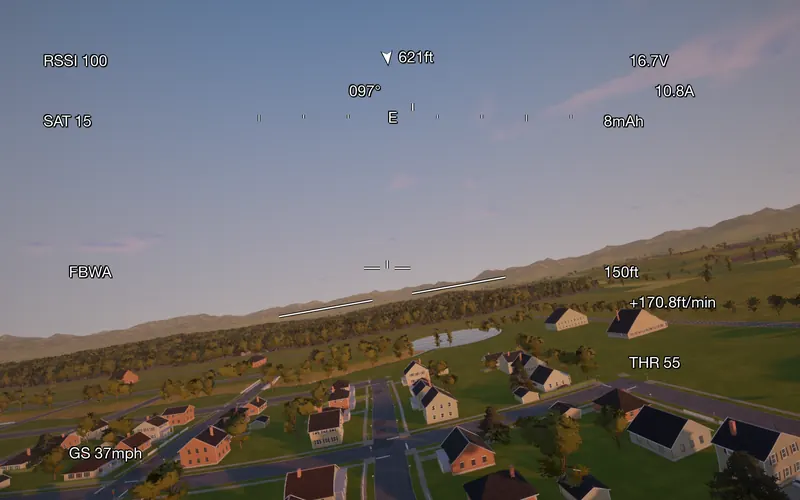
2. Know how your video fails
| Analog 5.8 GHz | Digital systems | |
|---|---|---|
| As signal weakens | Gradual: snow, then loss of color, then the picture tears sideways and rolls | Stays clean until near the limit |
| Near the limit | Mostly snow, picture barely usable | Blocks up, then freezes |
| Warning you get | Plenty: the snow is your cue to turn back | Little: turn back on link or video indicators, not on picture quality |
| Sudden flashes | Multipath reflections; antenna shadowed by the fuselage in a bank | Drops and stutters in the same situations |
Causes are the same for both: distance, terrain or trees blocking the path between you and the plane, the fuselage or battery shading the antenna in turns, and mismatched antenna polarisation.
3. Know your failsafe, exactly
Receiver
Set the receiver to no pulses on signal loss. ArduPilot's documentation calls this much preferred: the flight controller sees the loss and runs its own failsafe. A receiver that holds the last stick positions hides the loss.
ArduPlane defaults
| Parameter | Default | Meaning |
|---|---|---|
RC_FS_TIMEOUT | 1.0 s | Time without signal before an RC failsafe |
| Short failsafe | about 0.5 s later | FS_SHORT_ACTN 0: CIRCLE in manual and stabilised modes; AUTO, GUIDED and LOITER continue |
FS_LONG_TIMEOUT | 5 s | FS_LONG_ACTN 0: RTL if you were in a manual or stabilised mode; AUTO continues |
RTL_ALTITUDE | 100 m | Return altitude; set it above the highest obstacle on your route |
INAV defaults
INAV's default failsafe procedure is LAND, not return to home, and its default RTH altitude (nav_rth_altitude) is 10 m. Long-range pilots usually change both. Check yours in the configurator before you fly beyond line of sight of the field.
4. Link quality and turning back
- Link quality (LQ) is the share of control packets received. It stays high until close to the limit, then falls quickly. RSSI gives a more gradual picture of your margin.
- Common guidance for ExpressLRS is to turn back with 5–10 dB of margin above the receiver's sensitivity limit, and certainly when LQ drops below 50%.
- For Crossfire in its slower modes, TBS suggests LQ 70% as the turn-back point.
- Plan the battery for the way home, against the wind. Fly out upwind so the return is downwind.
A practice session
- Fly a short out-and-back and call out the OSD values aloud: mode, height, distance, voltage, LQ.
- Fly behind a hill or low past trees until the video starts to degrade. Note the distance and turn back.
- Cut the control link in a stabilised mode and count the seconds to the short and long failsafe. Watch the RTL climb.
- Repeat with your INAV-style or ArduPilot-style settings until the sequence holds no surprises.
Rules still apply. In the US, the FAA's recreational rules require that you or a visual observer next to you can see the aircraft; goggles alone do not count. Check the rules where you fly.
Questions
What should my receiver do when it loses the signal?
For ArduPilot and INAV, the usual recommendation is "no pulses": the receiver stops sending, and the flight controller sees the loss and runs its failsafe. A receiver set to hold the last position hides the loss from the flight controller.
When should I turn back on a long-range flight?
Common guidance: turn back when link quality falls below about 50 percent on ExpressLRS, or 70 percent on Crossfire's slower modes, and plan your battery so you have a reserve for the trip home against the wind.
Fly Before: RC Flight Simulator is a native macOS app (Apple Silicon) for flying RC planes and fixed-wing VTOLs that runs real ArduPilot in one click through the free ArduPilot Helper. One-time purchase, not on sale yet.
Sources
- ArduPilot OSD: OSD overview, AP_OSD.cpp, AP_OSD.h
- ArduPlane failsafe: Failsafe function, Parameters.cpp
- INAV: Failsafe.md, Settings.md
- ExpressLRS: Signal health; Oscar Liang: LQ and RSSI
- Analog video: PySDR, analog FPV, Oscar Liang, video transmitters; digital: Oscar Liang, HDZero
- FAA: Recreational flyers
Changelog
- : First published.